
FRITO: Free-Tier AI Coding That Matches Claude Opus 4
- Posted on June 11, 2026
- cloud, engineering, AI, agentic, superinference, LLM, benchmark, FRITO
- By Carlos Camacho
What if an autonomous AI coding agent using only free-tier API providers could match the accuracy of Claude Opus 4?
We built FRITO (Free-tier Retrieval & Inference Token Ops), a provider pool that rotates between free APIs from Google, Groq, Cerebras, HuggingFace, OpenRouter, and Mistral. Then we ran it against our 10-challenge coding benchmark alongside Claude Opus 4, Gemini 2.5 Pro, and Gemini 2.5 Flash.
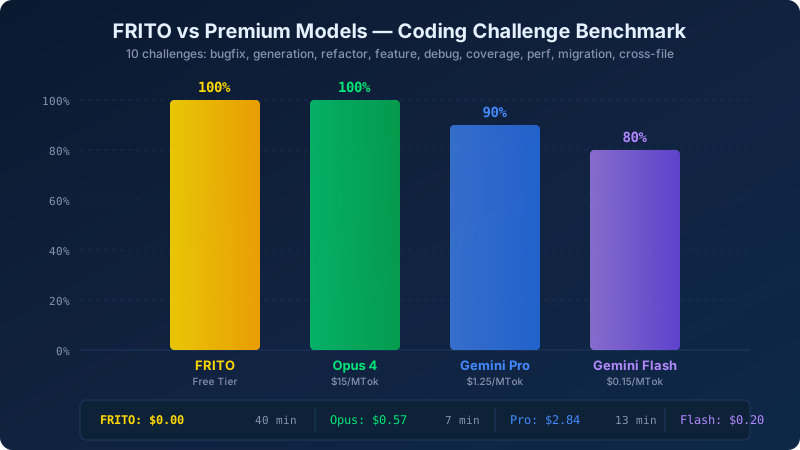
The result: FRITO scored 100% — matching Opus 4 and beating both Gemini models.
The Benchmark
Our challenge suite covers the full spectrum of real-world coding tasks that AI agents face daily:
| # | Challenge | Category |
|---|---|---|
| 1 | Single-file bugfix | Debug |
| 2 | Multi-file bugfix | Debug |
| 3 | Code generation from scratch | Generation |
| 4 | Extract and refactor | Refactor |
| 5 | Feature addition to existing code | Feature |
| 6 | Debug from stack trace | Debug |
| 7 | Test coverage expansion | Testing |
| 8 | Performance optimization | Optimization |
| 9 | API migration | Migration |
| 10 | Cross-file feature implementation | Feature |
Each challenge provides source files and a test suite. The agent reads the task description, modifies or creates files, and its solution is evaluated by running the test suite. No human intervention — fully autonomous.
Results: The Full Comparison
| Model | Pass Rate | Total Time | Avg Turns |
|---|---|---|---|
| FRITO (free tier) | 10/10 (100%) | 40 min | 14.6 |
| Claude Opus 4 | 10/10 (100%) | 7 min | 2.9 |
| Gemini 2.5 Pro | 9/10 (90%) | 13 min | 11.5 |
| Gemini 2.5 Flash | 8/10 (80%) | 11 min | 10.4 |
FRITO uses more turns (14.6 average vs 2.9 for Opus 4) and takes longer (40 minutes vs 7 minutes). But it arrives at the same destination — every single challenge solved.
Per-Challenge Breakdown
| Challenge | FRITO | Opus 4 | Gemini Pro | Gemini Flash |
|---|---|---|---|---|
| 01 Single-file bugfix | 14 turns, 3m | 8 turns, 25s | 50 turns, 2.9m | 50 turns, 2.4m |
| 02 Multi-file bugfix | 18 turns, 5.5m | 4 turns, 30s | 50 turns, 2.9m | 50 turns, 2.7m |
| 03 Code generation | 10 turns, 50s | 3 turns, 15s | 50 turns, FAIL | 3 turns, 13s |
| 04 Refactor extract | 29 turns, 17m | solved, 2.1m | 9 turns, 1.3m | 50 turns, 2.4m |
| 05 Feature addition | 14 turns, 3.2m | 4 turns, 45s | 11 turns, 1m | 50 turns, 2.8m |
| 06 Debug stack trace | 10 turns, 49s | solved, 20s | 50 turns, FAIL | 50 turns, 1.8m |
| 07 Test coverage | 10 turns, 53s | solved, 56s | — | 50 turns, 3.2m |
| 08 Perf optimization | 11 turns, 1.9m | solved, 28s | 50 turns, 3.6m | 50 turns, 2.3m |
| 09 API migration | 16 turns, 4.2m | 5 turns, 30s | 9 turns, FAIL | 50 turns, 2.5m |
| 10 Cross-file feature | 14 turns, 3m | 5 turns, 45s | 50 turns, FAIL | 50 turns, FAIL |
Notice the pattern: FRITO takes more turns on every challenge, but it never fails. Even on the hardest tasks — refactor extract (29 turns) and multi-file bugfix (18 turns) — it eventually finds the solution by iterating through its provider pool, trying different models, and self-correcting.
Meanwhile, the other models sometimes fail outright: Gemini 2.5 Pro hit its 50-turn limit on code generation, debug stack trace, API migration, and cross-file feature without solving them. Gemini Flash failed on the cross-file feature too.
How FRITO Works
FRITO is built into the SuperInference agent framework. The architecture has three key components:
1. Provider Pool Rotation
Six free-tier providers are configured in a pool, each with their own rate limits, API keys, and model offerings:
| Provider | Model | RPM Limit | Speed |
|---|---|---|---|
| Gemini 2.5 Flash | 15 | Fast | |
| Groq | Llama 3.3 70B | 30 | Fast |
| Cerebras | ZAI-GLM 4.7 | 30 | Fast |
| OpenRouter | Llama 3.3 70B (free) | 10 | Medium |
| Mistral | Mistral Small | 5 | Medium |
| HuggingFace | DeepSeek V3 | 10 | Medium |
When one provider hits its rate limit, the engine immediately rotates to the next available one. There’s no retry-and-wait loop — the request goes straight to the next provider in the pool.
2. RPM Pacing
Rather than firing requests as fast as possible and hitting 429 errors, FRITO proactively paces requests. Each provider tracks its last request timestamp and calculates the minimum interval between calls:
minInterval = 60,000ms / requestsPerMinute
delay = max(0, minInterval - elapsed)
For Google at 15 RPM, that’s a 4-second minimum gap between calls. For Groq at 30 RPM, it’s 2 seconds. This means the engine rarely hits rate limits in the first place, and when it does, rotation is instant.
3. Dual-Model Architecture
Some free-tier providers (like HuggingFace) don’t support tool calling. FRITO handles this with a dual-model approach: when the pool selects a model without tool support, it runs a reasoning phase with that model (planning what to do), then executes the actual tool calls through a tool-capable model from another provider. This lets FRITO use the reasoning capabilities of every model in the pool, even those that can’t directly call tools.
The Insight: Autonomous Agents That Never Stop
The fundamental insight is simple:
If your agent is autonomous, time is not a constraint — it’s a resource.
A human developer using an AI assistant cares about latency. Waiting 40 minutes for a response is unacceptable in an interactive session. But for autonomous tasks — CI pipelines, overnight batch processing, background code maintenance, automated PR review — the clock doesn’t matter.
This unlocks a different paradigm: long-running autonomous agents that operate continuously at scale. Imagine fleets of agents working around the clock — reviewing every PR in your organization, triaging incoming issues, running regression hunts across your test suite, migrating deprecated APIs file by file, or generating test coverage for untested code paths. Each agent takes more turns and more time than a frontier model would, but it runs unattended and delivers the same quality.
The real power emerges at scale. A single FRITO agent handles 10 tasks overnight while you sleep. Ten agents handle a hundred. A hundred agents can sweep an entire codebase — refactoring, testing, documenting — as a background process that runs continuously. Tasks that would be impractical to assign to human developers (or too tedious) become tractable when you can deploy persistent autonomous agents that self-correct and iterate until every test passes.
This isn’t about replacing interactive AI assistants. It’s about enabling a new class of workload: always-on AI operations that maintain, improve, and guard your codebase autonomously, scaling horizontally without scaling effort.
The Broader Implication
This result challenges a common assumption in the AI industry: that model quality is primarily a function of model size and training cost. Our benchmark shows that for well-structured agentic tasks, the orchestration layer matters more than the individual model.
A simple model that can try, fail, and retry with different approaches — rotating through providers, self-correcting from test failures, and iterating until tests pass — achieves the same outcome as a frontier model that gets it right in fewer attempts.
This has implications for:
-
Startups: Deploy autonomous agents for background and batch tasks from day one — free-tier rotation delivers frontier-quality results with zero infrastructure overhead.
-
Open source: Projects can integrate AI assistance without requiring users to bring premium API keys. FRITO works with free accounts from any of the six providers.
-
Scaling autonomous operations: The combination of provider rotation and self-correcting iteration means you can run fleets of long-lived agents — maintaining codebases, enforcing standards, and catching regressions — as a continuous background process.
Try It Yourself
FRITO is available today through three interfaces in SuperInference. All three require the same one-time setup: create free API accounts and configure your keys.
1. Setup: Get your free API keys
Create free accounts at any combination of these providers (the more you configure, the larger your rotation pool):
| Provider | Sign Up |
|---|---|
| Google AI Studio | aistudio.google.com/apikey |
| Groq | console.groq.com/keys |
| Cerebras | cloud.cerebras.ai |
| OpenRouter | openrouter.ai/keys |
| Mistral | console.mistral.ai/api-keys |
| HuggingFace | huggingface.co/settings/tokens |
You can provide keys via environment variables:
export GOOGLE_API_KEY="AIzaSy..."
export GROQ_API_KEY="gsk_..."
export CEREBRAS_API_KEY="csk-..."
export OPENROUTER_API_KEY="sk-or-..."
export MISTRAL_API_KEY="your-key"
export HF_TOKEN="hf_..."
Or create the configuration file directly at
~/.ami/frito.json. This is the file FRITO reads at
startup — you can build it by hand or let /frito setup
generate it:
{
  "enabled": true,
  "quality": "balanced",
  "providers": {
    "google": {
      "keys": ["AIzaSy..."],
      "model": "gemini-2.5-flash",
      "tier": "permanent"
    },
    "groq": {
      "keys": ["gsk_..."],
      "model": "llama-3.3-70b-versatile",
      "tier": "permanent"
    },
    "cerebras": {
      "keys": ["csk-..."],
      "model": "zai-glm-4.7",
      "tier": "permanent"
    },
    "openrouter": {
      "keys": ["sk-or-..."],
      "model": "meta-llama/llama-3.3-70b-instruct:free",
      "tier": "permanent"
    },
    "mistral": {
      "keys": ["your-mistral-key"],
      "model": "mistral-small-latest",
      "tier": "permanent"
    },
    "huggingface": {
      "keys": ["hf_..."],
      "model": "deepseek-ai/DeepSeek-V3-0324",
      "baseUrl": "https://router.huggingface.co/v1",
      "tier": "permanent"
    }
  }
}
The quality field controls model selection: "min"
accepts any model, "balanced" skips budget-tier models,
and "max" uses only premium-tier models. Each provider
entry supports multiple keys — if you have several Google
API keys, list them all in the keys array and FRITO
will rotate between them when one hits its rate limit.
You don’t need all six providers. Even two or three give you meaningful rotation capacity. The more you add, the larger the pool and the less likely you are to stall waiting for a rate limit to reset.
2. Interactive CLI (REPL)
Launch the AMI CLI and use the /frito slash command to
configure and enable free-tier routing:
ami
Inside the REPL:
/frito setup      # Interactive wizard — detects your keys
/frito status     # See which providers are active
/frito on         # Enable free-tier routing
Once FRITO is active, every prompt you send is automatically routed through the provider pool. You’ll see which model is handling each turn in the status bar.
3. CLI Detached Mode (Autonomous)
For autonomous tasks — the mode used in the benchmark — run AMI in detached mode with a prompt:
ami --prompt "Fix the bug in src/parser.ts — the test
command is: npm test" --max-turns 50 --yolo
With FRITO configured, AMI automatically uses the provider
pool. The --max-turns 50 flag gives the agent room to
iterate, and --yolo auto-approves tool calls for fully
unattended execution. This is the same mode the benchmark
uses — the agent reads files, edits code, runs tests, and
self-corrects until the tests pass.
You can also pipe the output to JSON for programmatic use:
ami --prompt "Migrate callback API to async/await in
src/api.ts" --max-turns 50 --yolo --output-format json
--quiet > result.json
4. VS Code Extension
Install the SuperInference extension from the VS Code marketplace. Open the AMI chat panel and run:
/frito setup
The extension detects your configured API keys and enables provider rotation. From there, every chat message routes through the FRITO pool — you get the same multi-provider resilience directly in your editor.
What’s Next
We’re exploring several directions:
- Parallel provider execution: Send the same prompt to multiple free providers simultaneously and use the fastest valid response
- Adaptive quality routing: Route simple tasks to faster models and complex tasks to more capable ones
- Provider health monitoring: Track per-provider success rates and deprioritize providers that produce more errors
- Expanded benchmark: Adding challenges for documentation generation, security fixes, and multi-language support
The key takeaway: the best AI coding agent isn’t necessarily the one with the largest model — it’s the one with the smartest orchestration.
FRITO is part of SuperInference, an open-source feedback-augmented LLM agent framework. The full benchmark results and provider configuration are available in the GitHub repository.
Responses
Want to leave a comment? Visit this post's issue page on GitHub (you'll need a GitHub account. What? Like you already don't have one?!).